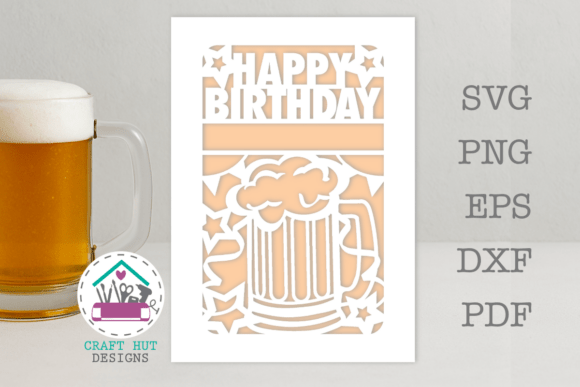
Happy Birthday Beer Tankard Mug SVG DXF & Card Template
Celebrating a special birthday calls for a personal touch, especially when the guest of honor appreciates a good brew. The Happy Birthday Beer Tankard Mug SVG DXF and coordinating card template offers a creative, hands-on way to craft memorable party decorations, favors, and greetings. This instant download digital file is designed for use with Cricut, Silhouette, and other cutting machines, providing a complete template to build a three-dimensional beer tankard card or a custom mug design.
This versatile design asset includes multiple file formats to ensure compatibility with your preferred software. You will receive SVG, PNG, EPS, DXF, and PDF files, giving you flexibility for various projects. The template features both a front and back panel, allowing you to construct a full card that can be personalized with the recipient's name. It's a fantastic resource for creating unique invitations, party decor, or even a standout gift tag that matches the birthday theme.
Practical Applications for Your Crafting Projects
The true value of this design lies in its application. Imagine crafting a set of personalized birthday cards where each one resembles a frothy beer mug. This template simplifies the process, making it ideal for both novice and experienced crafters. Beyond cards, the SVG and DXF files can be adapted for creating vinyl decals for actual beer tankards, custom t-shirts for a birthday party, or even intricate paper cutouts for table centerpieces. The transparent background PNG file is perfect for digital designs, such as social media graphics or printable party decorations.
Tips for Personalizing in Design Space
To get the best results from your Happy Birthday Beer Tankard Mug SVG DXF file, following a few simple steps in your cutting machine's software, like Cricut Design Space, can make all the difference. Start by uploading the SVG file and inserting it onto your canvas. You can easily resize the entire design by dragging the corner handles to fit your project dimensions.
- Add Custom Text: Use the text tool to type the recipient's name. A bold, condensed font like Futura LT Condensed Bold works well for a clean, impactful look. Position the text so it slightly overlaps the card template's design area.
- Weld Your Design: Select both the card design and your text layer, then click the "Unite" or "Weld" function. This crucial step merges the text with the card outline, ensuring a single, clean cut line.
- Add a Score Line: For a crisp fold, insert a score line. Make it central to the card template and use the "Attach" function to keep it aligned with your design before sending it to cut.
Choosing the Right Design Assets
When selecting any creative font or template, considering its practicality is key. This beer tankard design excels in projects requiring a playful, celebratory, or craft-beer aesthetic. Its strength is in its specificity—it solves a clear design need with a polished, professional template. For broader branding or editorial design, you might pair elements from this SVG with complementary typefaces, such as a clean sans serif font for body text or a playful script font for accent words, to create a cohesive visual identity for your event.
Always verify that the license for any digital asset fits your intended use, whether for personal projects or commercial merchandise. The right design asset doesn't just look good; it streamlines your workflow, enhances visual consistency, and helps your projects look thoughtfully executed. Choosing a well-crafted template like this one provides a reliable foundation, allowing your creativity to focus on the personal details that make each birthday celebration unique.