Ignite Your Typography with Fire Text Effects
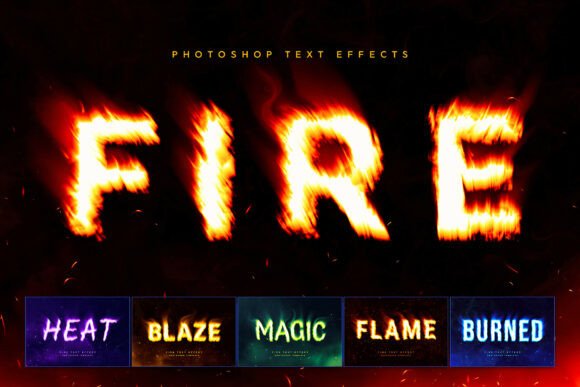
Imagine your text or logo not just displayed, but engulfed in a realistic, roaring inferno. That’s the power of a premium Fire Text Effects toolkit, designed to transform ordinary lettering into a cinematic title screen with blazing flames, dynamic embers, and atmospheric smoke. This collection of Photoshop templates offers a streamlined way to create high-impact visuals that demand attention.
At its core, this toolkit is a generator for modern typography. It moves beyond a simple static font, providing a Smart Object workflow that instantly wraps your chosen typeface or vector monogram in a complete combustion scene. The result includes volumetric lighting, heat distortion, and layered smoke, producing a cohesive and professional asset in seconds.
Where This Creative Asset Shines
The versatility of this effect makes it a valuable design asset for numerous projects. Its aggressive, high-energy style is particularly well-suited for:
- Brand Identity & Logo Design: Create unforgettable logos for gaming teams, music producers, or streetwear brands that need to project power and intensity.
- Poster Design & Editorial Layouts: Design striking movie posters, event flyers, or magazine covers that require a dramatic, eye-catching headline.
- Social Media Graphics: Craft scroll-stopping YouTube thumbnails, Instagram posts, or stream overlays that instantly capture viewer interest.
- Merchandise & Packaging: Develop bold graphic placements for apparel, album covers, or product packaging that stands out in a crowded market.
Choosing and Using Your Fiery Typography
When integrating such a powerful display font effect, a few considerations ensure the best results. First, readability is key. While the flames add spectacle, ensure your core text remains legible at the intended size. The toolkit’s six style variations—from classic orange to mystical green—allow you to match the mood precisely, whether it’s for a rock album or a fantasy game.
Think about font pairing. The fire effect works best with strong, bold sans-serif or serif fonts that have enough weight to anchor the design. Pair it with a cleaner, more minimalist typeface for body text to maintain visual hierarchy and balance. Always test the final composition to ensure the typography and effect work in harmony without overwhelming the overall design.
Finally, consider the practical workflow. The inclusion of multiple PSD files and a PDF guide means you can quickly adapt the templates. Always verify that the license covers your intended commercial use, whether for client work, merchandise, or digital products. A well-chosen, premium font effect like this doesn’t just add decoration; it elevates your entire project, enhancing visual consistency and professional presentation.
Choosing the right typographic treatment is a crucial step in any creative project. A specialized asset like Fire Text Effects provides a focused solution for creating dynamic, high-energy visuals. By understanding its strengths and applying it thoughtfully, you can produce polished, impactful designs that truly ignite your audience’s imagination and strengthen your creative work.